Posts

Showing posts with the label personal-projects

Using pynput on macOS

Image
While working on my personal project Darth-Vader-RPi , I used the Python package pynput for monitoring the keyboard as to simulate push buttons on a Raspberry Pi. However, some keyboard keys were not detected on macOS without running the script with sudo (after adding PYTHONPATH to etc/sudoers ).  The keyboard keys that didn't need sudo were the following: alt keys cmd keys ctrl keys media buttons for play, pause, volume up/down/mute shift keys The other keyboard keys (all the alphanumeric and some special keys such as backspace and right) required the Python script to run with sudo . The pynput documentation explains the modifications you should apply to your application if you want to make it run on Linux, macOS, or Windows. Image credit:   "Apple Key"  by  Antijingoist  is licensed under  CC BY-NC-ND 2.0
A Raspberry Pi project about activating Darth Vader with LEDs and sounds

Image
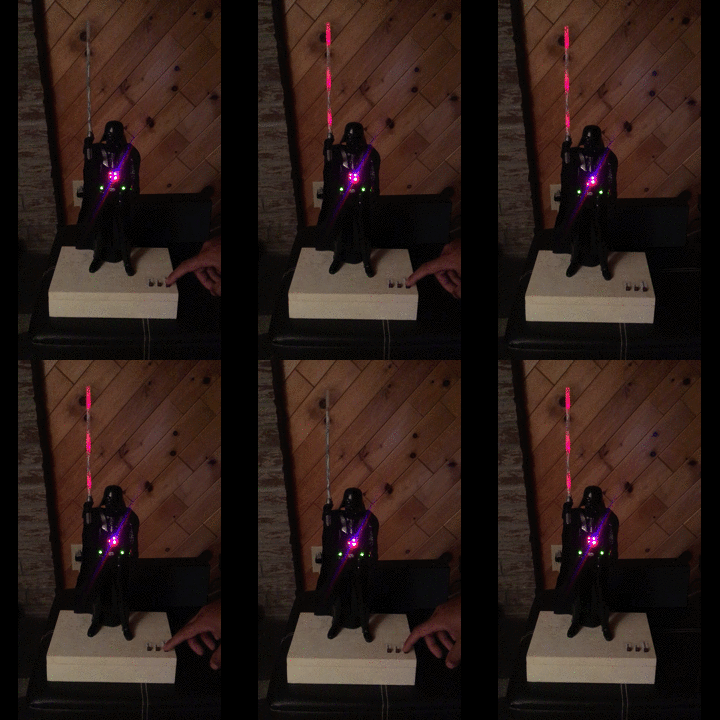
Darth-Vader-RPi is a Python-based Raspberry Pi (RPi) project about activating a Darth Vader action figure by turning on LEDs on his suit and lightsaber, and by playing sounds such as some of his famous quotes. Click on the gif to play the video The Darth Vader action figure is 11.5 inches tall (which is this one from Hasbro ) and was modified to make it more lifelike by illuminating the lightsaber, chest control box, and belt. 3 push buttons control the following sounds and LEDs: Some of his famous quotes The Imperial march theme song The lightsaber opening and retraction sounds The lightbsaber illumination (3 LEDs) His iconic breathing sound plays in the background indefinitely as soon as the RPi is run with the start_dv   script. Connection diagram Here’s how the various LEDs and push buttons are connected to the Raspberry Pi: The lightsaber is illuminated by 3 LEDs connected in parallel. The Top , Middle , and Bottom LEDs illuminate the slots in Darth Vader's chest control...

Introducing the Python library SimulRPi

Image
SimulRPi is a Python library that I wrote as part of my Darth-Vader-RPi  project. It partly fakes RPi.GPIO and simulates some I/O devices connected to a Raspberry Pi (RPi): push buttons by listening to pressed keyboard keys and LEDs by displaying blinking red dots in the terminal along with their GPIO pin numbers. The Python package pynput is used to monitor the keyboard for any pressed key. Thus, the SimulRPi library can be useful in the case that you want to try your  RPi.GPIO -based script by running it on your computer when no RPi is available at the moment. Example: terminal output Simulating LEDs on an RPi via a terminal Each dot represents a blinking LED connected to an RPi and the number between brackets is the associated GPIO channel number. Here the LED on channel 22 toggles between on and off when a key is pressed. Dependencies Platforms:  Linux, macOS Python:  3.5, 3.6, 3.7, 3.8  pynput >=1.6.8: for monitoring the keyboard for any pressed key...

Data analysis of developer job posts from Stack Overflow

Image
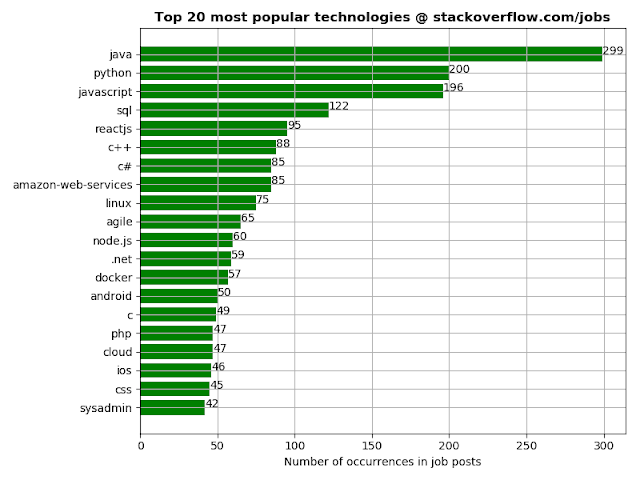
I did some data analysis on developer job posts from Stack Overflow with the aim of coming up with interesting insights about different aspects of job posts such as what are the most popular technologies, or the locations of job posts around the world as visualized on a map. After much data processing, I finally got the graphs I was looking for. I will show the most interesting graphs since there are too many to choose from and if you want to see the complete set of graphs, go to my personal website ; you will also find there explanations about how I managed to produce the data necessary to generate the graphs. The project is implemented in Python3 and makes use of a bunch of modules (e.g. BeautifulSoup4, matplotlib, plotly) for building the whole pipeline of generating the maps, graphs and reports. Contents 1. Sources of data and some initial stats 2. Bar chart: popularity of technologies based on number of occurrences in job posts 3. World map of job posts 4. Interactiv...